 Ernie.SG

In part I, I talked about some of the simple prototypes I’ve built to date and how they led me to this place where I need a stable, extensible, flexible and scalable stack for LLM-based products because there’s so many intereting things to be built. We discussed how we can flexibly swap components in and out of our proposed suite of A.I.-driven software with registries and base classes, making it easier for developers to collaborate, but what about the end user experience? For the kind of flexibility and modularity I’m aiming for, combining a registry pattern with an interface-driven design could be the ideal approach. In this post, I will go over my proposed A.I./LLM engineering stack which is potentially generalisable to all deployments of interest, whether it’s to automate refactoring of legacy codebases, a knowledgebase over emails and documents, social media content generation and publishing, or new ways of consuming data for audiences.
Before we go on, let’s rehash the differences between traditional software development and ML-based approaches in terms of how they tackle the problem of artwork annotation.
Criteria
Traditional Software Development for Artwork Annotation and Tagging
Machine Learning-Based Development for Artwork Annotation and Tagging (e.g., OpenAI’s CLIP)
What it does
Uses pre-defined rules and metadata to annotate and tag artworks.
Uses learned patterns from data to dynamically annotate and tag artworks.
Depth of Annotation
Limited to explicit rules and available metadata.
Can identify a broader range of features, themes, and elements.
Adaptability
Requires manual updates for new styles and trends.
Can adapt to new styles and trends through retraining.
User Engagement
Manual incorporation of user feedback.
Can automatically incorporate user feedback for model fine-tuning.
Computational Complexity
Generally less computationally intensive.
Requires more computational resources for deeper analysis.
Interpretability
Easier to interpret due to explicit rules.
Often considered a “black box,” making it harder to interpret.
Coverage
Relies on availability and accuracy of metadata.
Can work directly with the visual elements of the artwork.
Manual Effort
Significant effort required to define rules and templates.
Reduced manual effort due to the model’s ability to generalize from training data.
Because of such differences in approach, there are critical differences in terms of workflow and development which is important for any organisation that wants to reap the advantage of A.I. to pay attention to. The areas of intersection and differentiation between the two are as follows:
Intersections:
-
Integration: ML models often serve as components within larger software systems, which are built using traditional software engineering techniques.
-
Testing and Validation: Both approaches use testing to validate that the code or model behaves as expected, although the specifics of the testing may differ.
-
Deployment and Maintenance: Whether you’re using a machine learning model or traditional software, both need to be deployed, monitored, and maintained.
-
Version Control: Both types of development often use version control systems like Git to manage changes and history. However, machine learning also requires versioning for data, models, hyperparameters, and results.
Differences:
-
Deterministic vs Probabilistic: Traditional software engineering is generally deterministic, following explicit rules and logic, while machine learning is probabilistic and learns patterns from data.
-
Interpretability: Traditional software is generally easier to debug and interpret, while machine learning models, especially complex ones, can be harder to understand.
-
Data Dependency: Machine learning is heavily dependent on data for training, validation, and testing, while traditional software engineering does not inherently require data for these phases.
-
Feedback Loop: Machine learning often involves a continuous feedback loop where the model learns from new data, whereas traditional software does not inherently have this feature.
-
Skill Set: Traditional software engineering and machine learning require different skill sets, although there’s growing overlap as software engineers become more data-savvy and data scientists learn more about software best practices.
- ML-Specific Skills: Includes statistical and mathematical understanding (probability, statistics, linear algebra, calculus), data skills (data cleaning, preprocessing, feature engineering, visualisation), model training and evaluation (algorithm selection, hyperparameter tuning, evaluation metrics), specialised tools and libraries (machine learning frameworks, data manipulation libraries), and experimentation (A/B testing, model interpretability).
I hope the examples above give a better idea of why the architecture and design pattern of A.I. engineering is an emergent craft all on its own.
A Registry-based, Interface-Driven Design Pattern
In object-oriented programming, especially in languages like Java, C#, and TypeScript, an “interface” is a type definition that specifies a contract: a set of methods (and possibly properties) that a class must implement. The interface itself doesn’t contain any implementation. It just defines what methods should exist in any class that claims to implement that interface.
For A.I.-driven or LLM-based applications that require stability and the flexibility for experimentation, the use of interfaces and abstract classes can be especially beneficial. A.I. development often involves a lot of experimentation – tweaking models, changing preprocessing steps, using different data sources. If your system is designed with modularity in mind (enabled by interfaces and abstract design patterns), then swapping out components for experimentation becomes much easier, without the risk of breaking other parts of the system. Moreover, when scaling or deploying A.I. systems, having a modular design ensures stability and maintainability.
In short, the interface provides a clear contract on what to expect.
Combining registry, abstract classes and interfaces:
-
You’d have interfaces for each type of functionality (e.g., file processing, chunking, embedding, storage, retrieval). This makes it clear what each component should do.
-
The registry can then be used to manage and provide the appropriate implementation of these interfaces at runtime. This allows the system to dynamically adapt to different scenarios or configurations.
For example, consider processing different file types:
-
Interface-Driven Part:
-
Let’s begin by defining an interface. For example, consider a
DataSourceinterface that has methods to ingest data and fetch metadata. This interface sets a clear contract for what every data source processor should do.from abc import ABC, abstractmethod class DataSource(ABC): @abstractmethod def ingest(self): pass @abstractmethod def get_metadata(self): pass
-
-
Registry Part:
-
Once the data is ingested (say, files from a Git repository), the system can look up the
FILE_TYPE_PROCESSORSregistry to find the appropriate processor based on each file’s extension.FILE_TYPE_PROCESSORS = { ".py": PythonFileProcessor, ".md": MarkdownFileProcessor, # ... }
-
When the system needs to ingest data, it can query this registry to find the appropriate processor based on each file’s extension.
-
Unified Workflow Inside
DataSourceSubclasses:- Within a
DataSourcesubclass, you can bring these two steps together. Ingest the data first, and then use the appropriate file processor on each ingested file.
- Within a
class GitRepoSource(DataSource):
def ingest(self):
files = self._clone_and_filter_files()
processed_data = []
for file_path in files:
ext = self._get_file_extension(file_path)
processor_class = FILE_TYPE_PROCESSORS.get(ext)
if processor_class:
processor = processor_class()
processed_data.append(processor.process(file_path))
return processed_dataCombined Benefits
This combined approach offers several advantages:
-
Easy Extensions: When a new data source type needs to be supported in the future, you only need to create a new class that adheres to the
DataSourceinterface and register it with theDataSourceRegistry. Existing code doesn’t have to be touched. -
Clear Expectations: The
DataSourceinterface ensures that every data source adheres to a common API, making the behavior of your ingestion pipeline predictable. -
Dynamic Adaptability: With the central registry in place, different data source processors can easily be swapped in or out without affecting the main workflow, providing a lot of flexibility.
For diverse use cases of having different agents (one for documents and PDFs, another for code repositories), this combination provides clear contracts (through interfaces) while retaining the ability to expand or adapt (using the registry). The stability comes from the interfaces, and the flexibility from the registry.
What happens when we want to give our A.I./LLM-based app new superpowers?
Extending Means of Interaction and Consumption:
Take for example what I want to do in “The Sound of Stories” - to parse LLM-generated text for multilingual narration as an add-on consumption method. You might want to enable the generation of images based on the generated story too. Consumption can be done by other tools or humans. For my intended use case of social media content generation, there’ll be a need to output structured .json for social media APIs to consume as well. A registry-based, interface-driven approach enables us to extend consumption as below.
-
Create a registry: As with the previous examples, you can have a registry of consumption methods (e.g., Text Display, Voice Output, Animated Video).
-
Consumption Interface:
class ConsumptionInterface(ABC):
@abstractmethod
def display(self, content):
pass- Concrete Implementations:
class TextDisplay(ConsumptionInterface):
def display(self, content):
# Simply print the content
class VoiceOutput(ConsumptionInterface):
def display(self, content):
# Use Text-to-Speech to vocalise the content
class AnimatedVideo(ConsumptionInterface):
def display(self, content):
# Convert content into animated videoNow then, let’s take a step back and look at the entire cycle of data-driven development for A.I. applications end-to-end.
A General, Simplified Architecture for A.I. Apps End-to-End
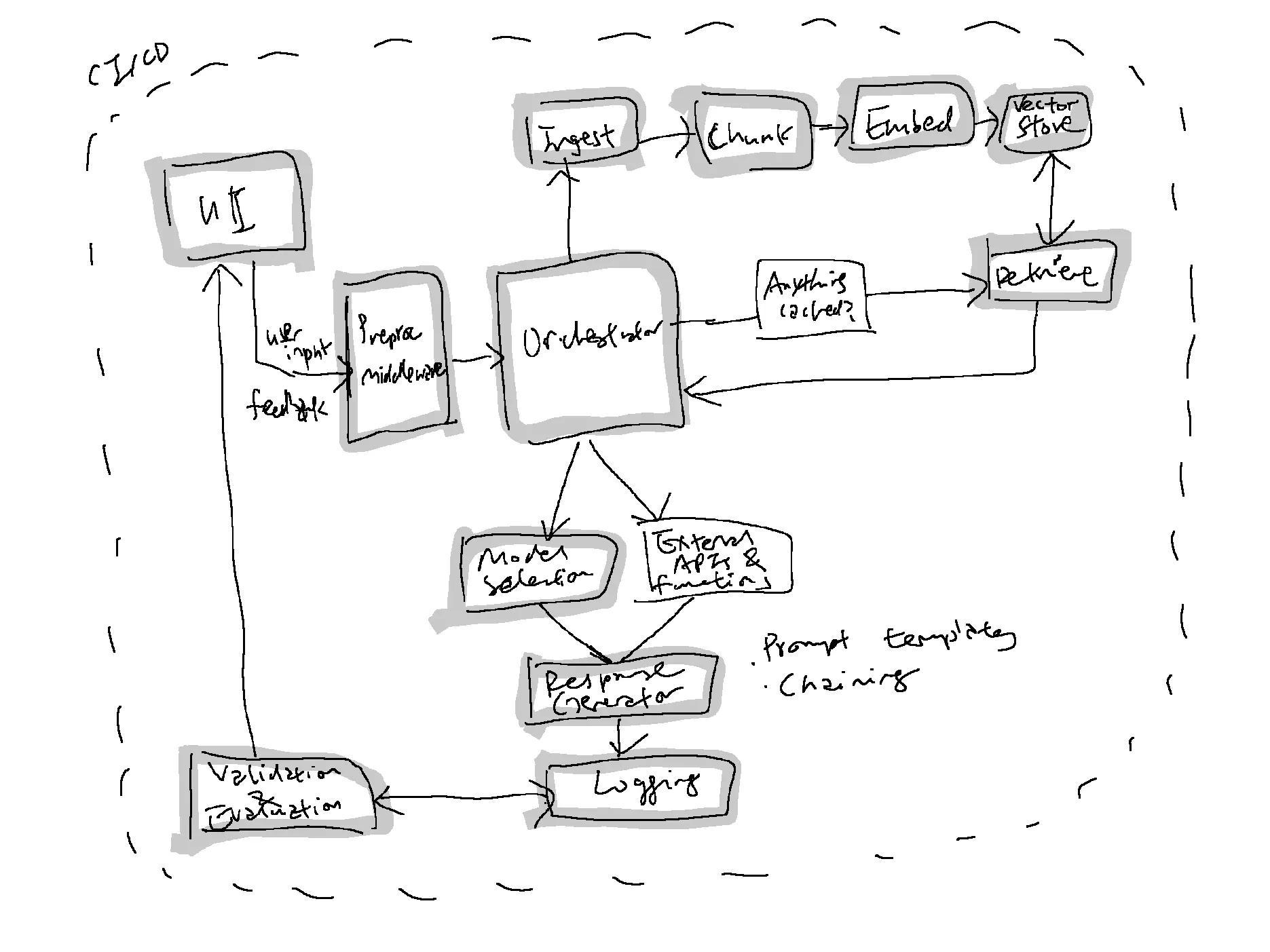
The A.I./LLM app stack is just emerging and a16z had very helpfully structured it around the general stages of prompt construction (retrieval), prompt execution (inference) and some toolings within the ecosystem. Data flows and pipelines are the backend plumbing to this ecosystem which is another important distinction vis-à-vis traditional software engineering as well. I have simplified my general architecture and components of focus for development below:
Example: A Flow-through With Neural Search Over Artworks
Previously, I had built a demo of neural search over artworks, extending the demo to serve for production could then involve these steps below.
Step
Component Involved
Action
Notes
1
Orchestrator
Initial data ingestion of artwork metadata and image embeddings
Batch mode operation
2
User Interface (UI)
User enters a search query or filter criteria
3
Main Application
Validates user input and fetches configuration
Checks with Configuration Manager
4
Orchestrator
Retrieves relevant embeddings from Vector Database
Possibly uses Retrieval Engine
5
Response Generator
Constructs user-friendly output
Formats artwork metadata and images for display
6
Logging Module
Logs the operation
Stores user queries, response times, etc.
7
Validation & Evaluation
Automatically evaluate results
Basic security checks
8
User Interface (UI)
Displays search results to the user
9
Feedback Collector
Collects user feedback, if any
Prioritisation for a 4-Month Developmental Roadmap
So there’s a whole lot of things that can be done within this general framework and architecture that I am interested in:
-
Neural search over artworks
-
Real-time, multilingual narration of generated stories
-
Refactoring and writing tests for a codebase
-
Chat with a knowledgebase over documents and data
-
Code generation
-
Social media content generation and publishing
For the purpose of prioritisation, given that reading comprehension and creative writing are 2 distinct skillsets and the former will be very valuable for the latter, my plan is to prioritise teaching LLMs to learn and start with less complex use cases such as neural search over artworks and a knowledgebase so a rough timeline might proceed as below:
-
Month 1-2: Neural Search Over Artworks - For foundational data pipelines.
-
Month 2-3: Chat with a Knowledgebase Over Documents and Data - To develop ingestion and retrieval methods and UI components.
-
Month 3-4: Refactoring and Writing Tests for a Codebase - Utilise insights and methods developed during the chat/knowledgebase phase for smarter automated testing and refactoring.
With the above, even as we are focusing on building neural search and a knowledgebase, I’m thinking that it would be good to start on a simplified workflow for refactoring and test generation by leveraging LLMs to query over our codebase, pass to a code quality service, then chain and/or use prompt templates to perform relevant automations such as refactoring and writing tests that can be split into branches for manual review initially, then subsequently automated if all tests are passed.
Meanwhile, here’s how I am trying to organise the project on my Git repository which I am expecting to evolve further still so the below is still very much a work-in-progress but here’s what I’m thinking the different folders should handle:
-
db - all database related operations such as CRUD
-
demos - where some “stable” demos and workflows are defined
-
gui - everything the user sees
-
src - the bulk of the source code for our interfaces and implementations
-
tests - unit and integration tests as well as fixtures for testing
I’m still missing the CI/CD, monitoring and evaluation components while the project structure is still being sorted out but I’m hoping to do some divide-and-conquer with other developers since I do need to deliver on “The Sound of Stories” (real-time, multilingual narration of generated stories) for the National Arts Council Arts x Tech Lab as well. If things go well though, these various developmental efforts should be highly synergistic and give me the building blocks for Berlayar A.I. the company. ;)
├── agents
│ └── __init__.py
├── dataloader.ipynb
├── db
│ ├── chunks.py
│ ├── connectors.py
│ ├── __init__.py
│ ├── main.py
│ ├── ops
│ │ ├── deeplake.py
│ │ └── __init__.py
│ └── utils.py
├── demos
│ ├── chat_adf
│ │ ├── chat.py
│ │ ├── tests.py
│ │ └── utils.py
│ ├── neural_search
│ │ └── upload.py
│ └── thesoundofstories
│ ├── audio
│ └── chat.py
├── diagram.py
├── gui
│ └── __init__.py
├── ingest_pdf.log
├── __init__.py
├── log_init.py
├── main.py
├── notebooks
│ ├── architecture.ipynb
│ ├── chat_adf.ipynb
│ └── dataloader.ipynb
├── poetry.lock
├── pyproject - Copy.toml
├── pyproject.tomlMeanwhile, putting this on the cold bench while I go off to focus on my upcoming exam for “Good Economics for Bad Times”.
Originally published on PubPub at erniesg.pubpub.org/pub/wpnv7rhs.